




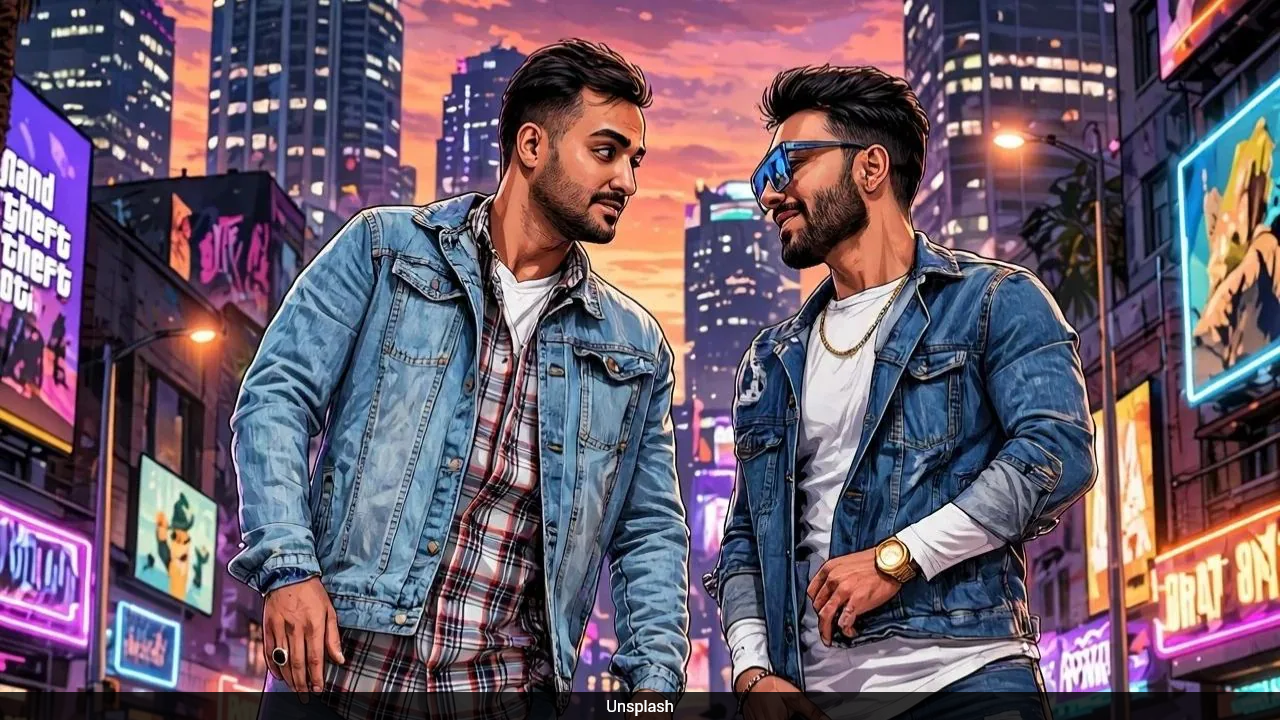
Artificial intelligence tools are making it easier than ever to create eye-catching images inspired by popular video games. One trend gaining attention on social media is GTA-style AI images, which turn ordinary photographs into colourful, dramatic visuals inspired by the Grand Theft Auto game series.
The best part is that you do not need professional graphic design skills or expensive editing software to create these images. Tools such as Google Gemini, ChatGPT and other AI image generators can help users achieve the look with just a photograph and a well-written prompt.
What Are GTA-Style AI Images?
GTA-style images are digital artworks inspired by the visual design of the Grand Theft Auto games. They often feature bold colours, dramatic lighting, sharp outlines and cinematic backgrounds.
These images usually give people a video game character appearance. A simple photograph can be transformed into artwork featuring a city street, luxury cars, sunset lighting or an action-packed urban setting.
The style is particularly popular among social media users who want to create unique profile pictures, posters and shareable images.
How to Create GTA-Style Images Using Google Gemini
Google Gemini is one of the AI tools that users can use to create GTA-inspired artwork. Follow these simple steps:
Step 1: Open Google Gemini
Visit the official Gemini website or open the Gemini app on your smartphone. Sign in to your Google account if required.
Step 2: Upload Your Photograph
Select the option to add an image and upload a clear photograph of yourself or the person you want to feature in the artwork. A well-lit photograph with a visible face can help produce better results.
Step 3: Enter a Detailed AI Prompt
After uploading your photograph, type a prompt explaining the style and appearance you want. Be specific about the colours, background, lighting and overall design.
For example, you can use this prompt:
"Transform this photograph into a Grand Theft Auto-inspired video game poster. Keep the person's facial features recognisable and create a bold illustrated look with vibrant colours, dramatic lighting, a modern city background and cinematic composition. Give it the appearance of high-quality open-world video game artwork."
Step 4: Generate the Image
Send your prompt and allow Gemini to process the request. If the first result is not what you expected, try changing the prompt or asking the AI to improve specific details.
Step 5: Save and Share Your Artwork
Once you are happy with the result, save the generated image to your device. You can use it as a profile picture, social media post or digital poster.
Other AI Tools You Can Use
Apart from Gemini, several other AI tools can help create GTA-inspired images.
1. ChatGPT
ChatGPT can generate images from text prompts and help transform an uploaded photograph into an illustrated video game-style portrait. Users can describe the desired background, colours and visual effects.
2. Adobe Firefly
Adobe Firefly offers AI image generation and editing features. It can help users experiment with illustrated characters, creative backgrounds and dramatic visual effects.
3. Canva AI
Canva provides AI-powered design features that can help users create posters and social media graphics. Its editing tools are also useful for adding text, layouts and other design elements.
4. Leonardo AI
Leonardo AI offers image generation features that can be used to create detailed characters, digital illustrations and video game-inspired artwork.
Tips for Getting Better GTA-Style AI Images
The quality of the final image depends heavily on the photograph and the prompt. Here are a few useful tips:
- Use a clear photograph with good lighting.
- Describe the visual style in detail.
- Mention the background you want, such as a city street or sunset.
- Ask for vibrant colours and cinematic lighting.
- Specify whether you want a realistic or cartoon-style appearance.
- Try different prompts if the first result does not look right.
- Check the generated image for facial or hand-related errors before sharing it.
Final Thoughts
Creating GTA-style images using AI tools is a simple way to explore digital creativity. Google Gemini, ChatGPT, Adobe Firefly and other platforms offer different features that can help users turn ordinary photographs into impressive video game-inspired artwork.
Whether you want a stylish profile picture or a colourful poster for social media, the right photograph and a detailed prompt can help you achieve an impressive result without advanced editing skills.
AI tools and their features may change over time, and some image generation options may require a paid subscription. Always check the platform's terms before using or sharing generated images commercially.
Track Latest News Live on NDTV.com and get news updates from India and around the world

