



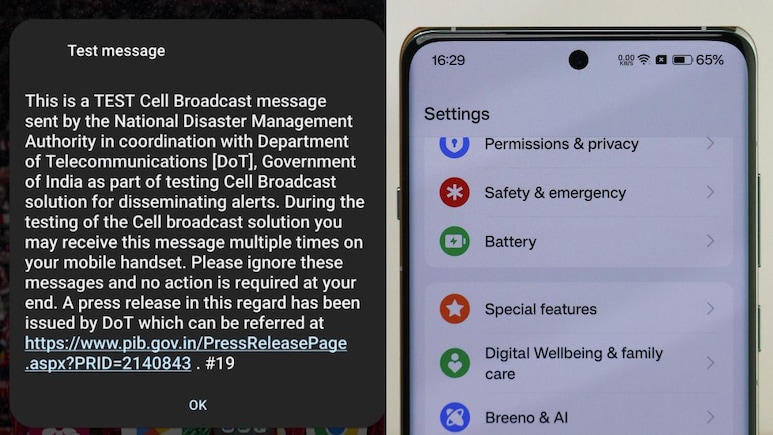
- The NDMA and Department of Telecom tested the emergency alert system on Feb 20
- The test sent broadcast messages triggering beeps or vibrations on smartphones
- The system notifies users of emergencies like earthquakes and floods in real time
The National Disaster Management Authority (NDMA) and the Department of Telecom conducted a live test of the emergency alert system on Friday (Feb 20) afternoon. The trial involved sending a broadcast message that triggered loud beeps or vibrations on Android and iOS smartphones to verify the government's new public safety initiative. Developed by the Centre for Development of Telematics (C-DOT), this system has been extensively used by disaster management authorities to issue SMS alerts in various Indian languages during natural disasters, weather warnings, and cyclonic events.
"This is a TEST Cell Broadcast message sent by the National Disaster Management Authority in coordination with Department of Telecommunications [DOT], Government of India as part of testing Cell Broadcast solution for disseminating alerts," read the alert message.
"During the testing of the Cell broadcast solution, you may receive this message multiple times on your mobile handset. Please ignore these messages and no action is required at your end," it added.
Why Are The Test Messages Sent?
The primary purpose of the Cell Broadcast Alert System is to provide real-time alerts during emergencies, helping save lives by spreading vital information quickly. This technology is designed to notify people about major threats such as earthquakes, floods, tsunamis, or other disasters.
This system is already operational in all 36 States and Union Territories (UTs) of India and sends various disaster or emergency-related alerts through SMS to mobiles of citizens affected in a particular geo-targeted area.
Unlike regular text messages, cell broadcasts can be sent to all mobile phones within a specific geographical area, ensuring wide and immediate coverage without overwhelming telecom networks.
If a user does not want to receive the emergency test alerts, they can simply opt out through the phone's settings. Android users can go to Safety and emergency (or Apps & notifications: Wireless emergency alerts) to toggle them off. If you are on an iPhone, scroll to the very bottom of the Notifications menu to find the disable option.
Track Latest News Live on NDTV.com and get news updates from India and around the world

